norrıth
Join the waitlist
Coming soon to iPhone

Your money, finally sorted.

Norrith connects your accounts, tracks your spending, and gives you a simple score for your financial health — plus an AI that answers questions in your own numbers. Be first to try it.

By joining, you agree we may email you about Norrith. One launch note — nothing else. See our Privacy Policy.

$109.99 / yr7 days freeCancel any time
9:41
Today
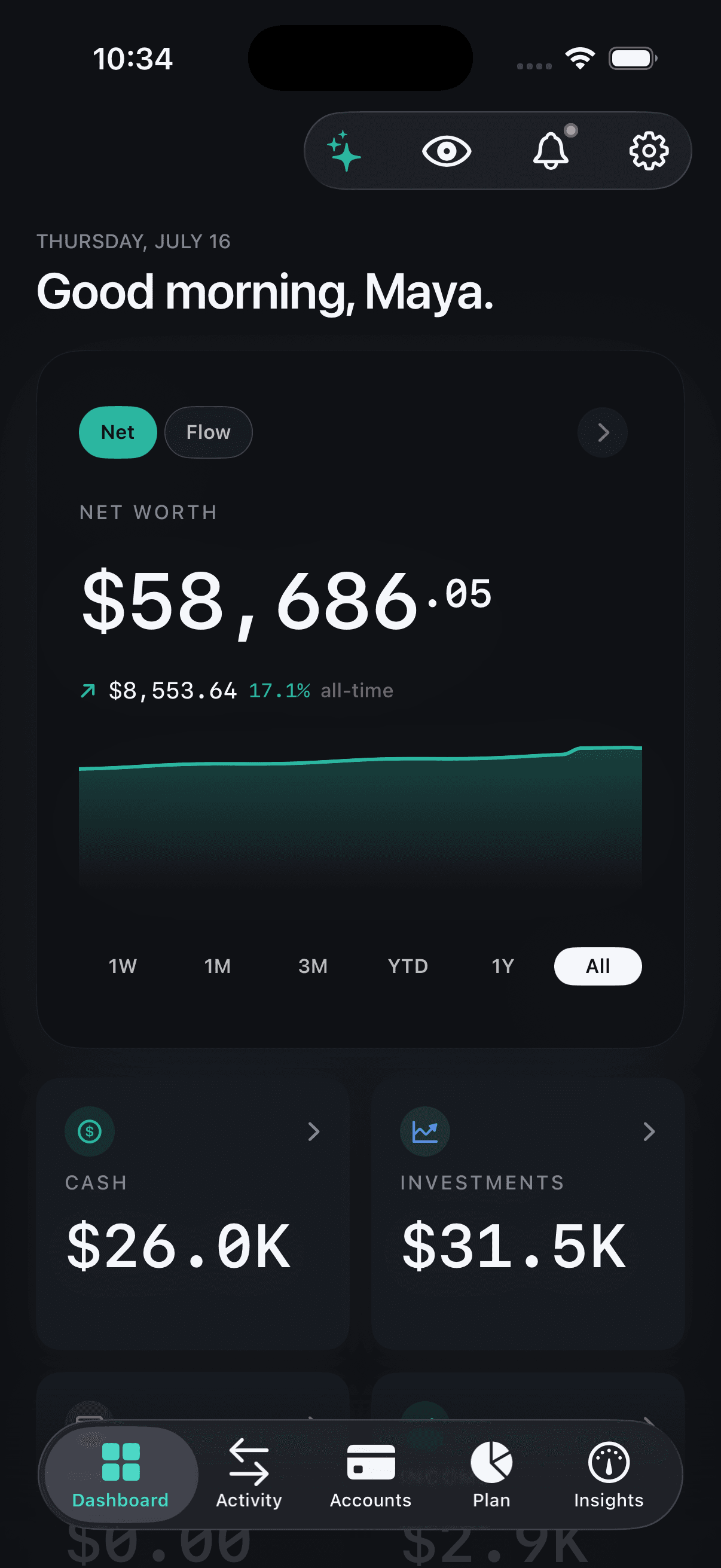
Net worth
$184,302
▲ $2,418 today
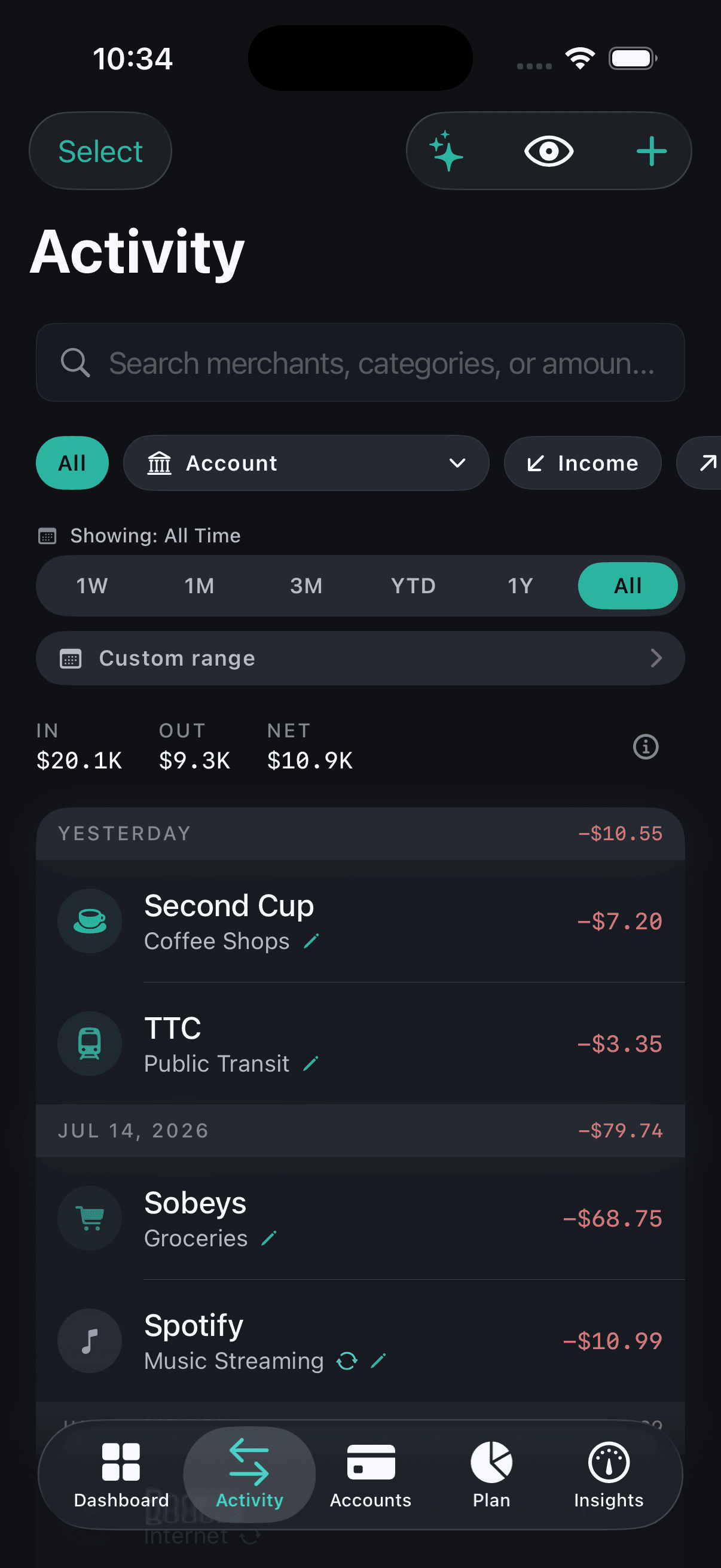
Stripe payout
Income
+$2,418
Whole Foods
Groceries
-$84.12
Lyft
Transport
-$14.40
Private by design
Encrypted on device and in transit. Your data lives in Canada.
Read-only connections
Plaid handles the bank handshake. Norrith can't move a cent.
We never sell your data
The business model is the subscription — not you.
How it works

Clarity in minutes — once you're in.

  1. 01
    Connect your accounts

    Securely link your banks through Plaid. Read-only — Norrith never sees or stores your bank login.

  2. 02
    See your whole picture

    Net worth, spending, and your health score, instantly. One clear dashboard you can scrub through over time.

  3. 03
    Get clarity

    Budgets, insights, and answers that keep you on track. Ask anything in plain English — Norrith answers in your real numbers.

One picture

All your money, finally together.

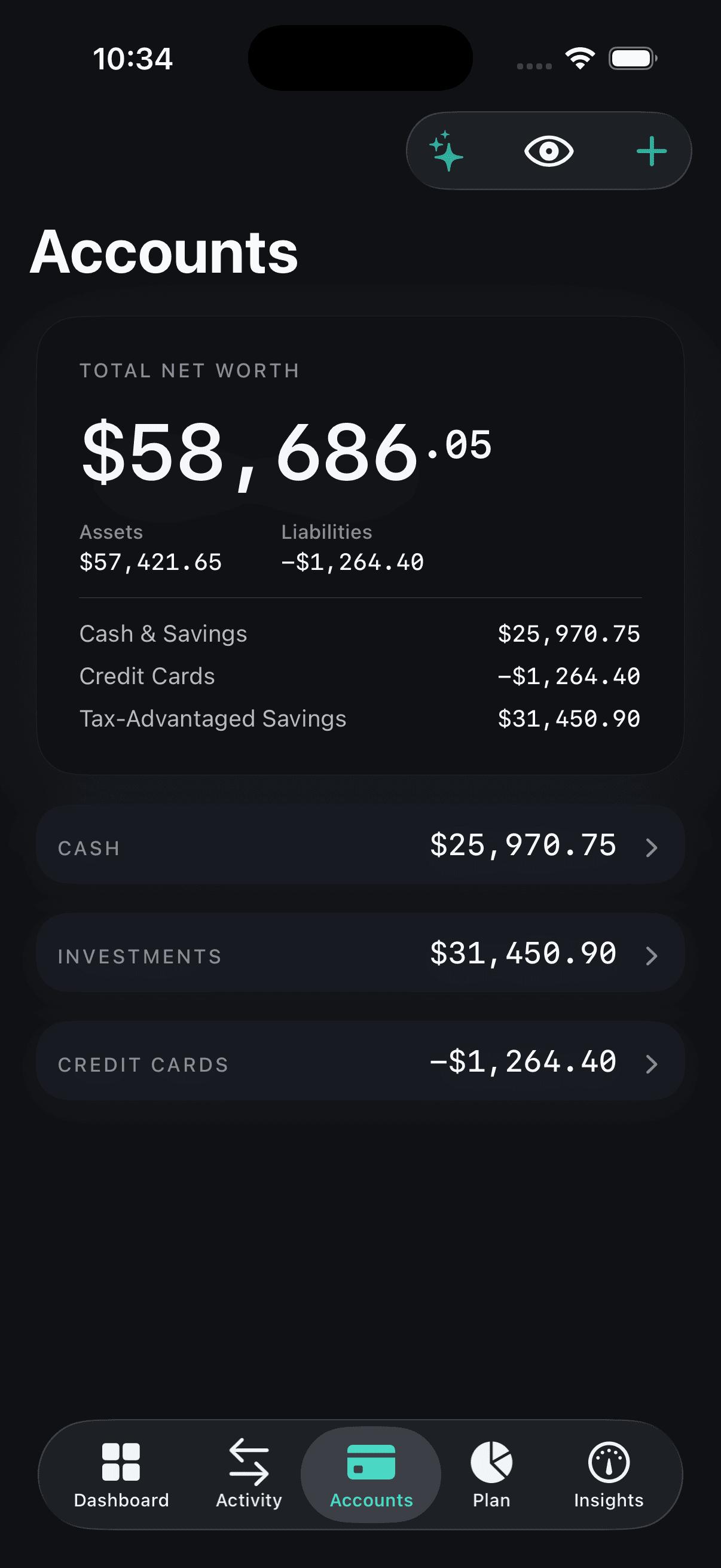
Chequing, savings, credit cards, investments, loans, even your home or car — Norrith pulls it into one live net-worth number that updates as your money moves. No spreadsheets, no adding it up in your head.
9:41
Today
Net worth
$184,302
▲ $2,418 today
Stripe payout
Income
+$2,418
Whole Foods
Groceries
-$84.12
Lyft
Transport
-$14.40
Am I okay?

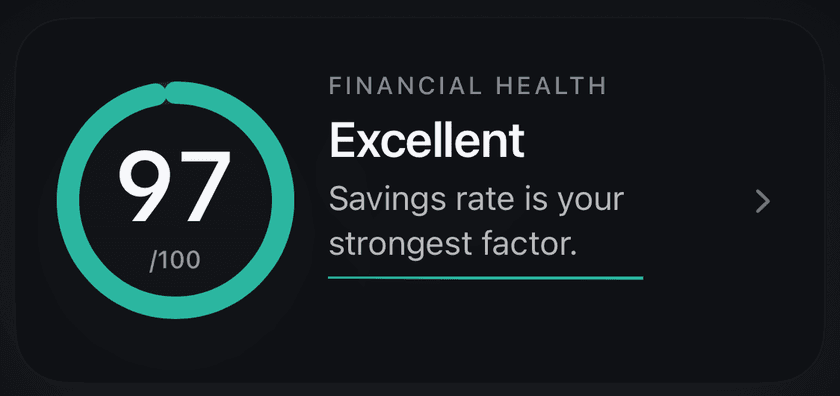
One honest score for your finances.

Norrith turns seven factors — savings rate, emergency fund, debt, net-worth trend, budgets, spending, and subscriptions — into a single 0–100 score. See exactly what's helping, what's hurting, and what to do next. No black box.

Financial health+4 this month
78/ 100
Top factors
Savings rate
86
Emergency fund
72
Net-worth trend
91
Discretionary spending
58
Get answers

Ask anything about your money.

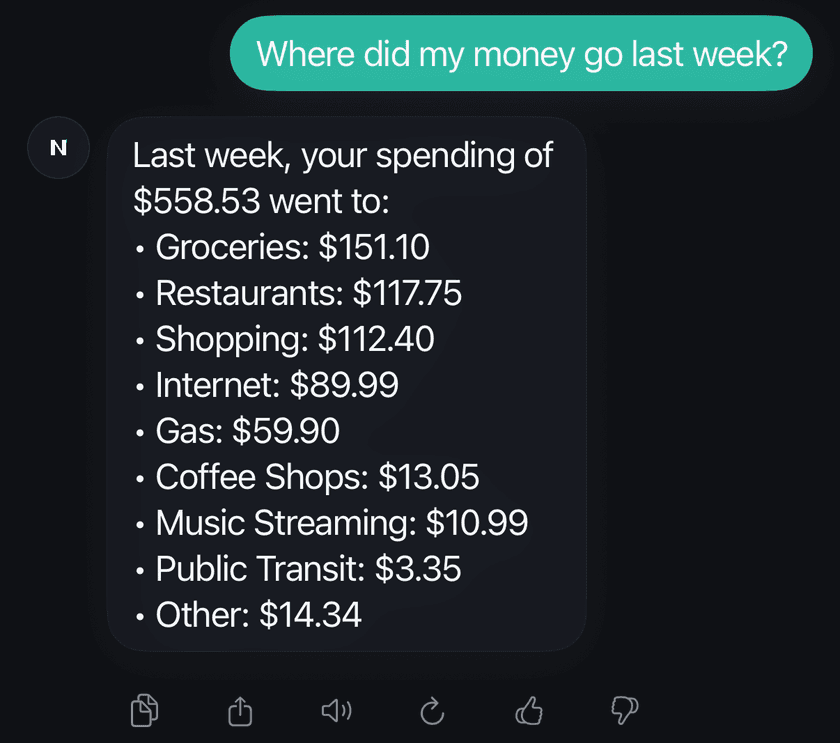
"How much did I spend on dining last month?" Norrith answers in your real numbers — no reports to build, no digging through transactions. Insights surface on their own, too, so you catch what matters without going looking.

NAsk Norrith
How much did I spend on dining last month?
You spent $402 on dining in May — that's up $128 from April. Top spots were La Banane, Café Pamenar, and a weekend grocery dash that I categorized as dining.
Ask another question…⌘ K
Look forward

Know you can cover the month.

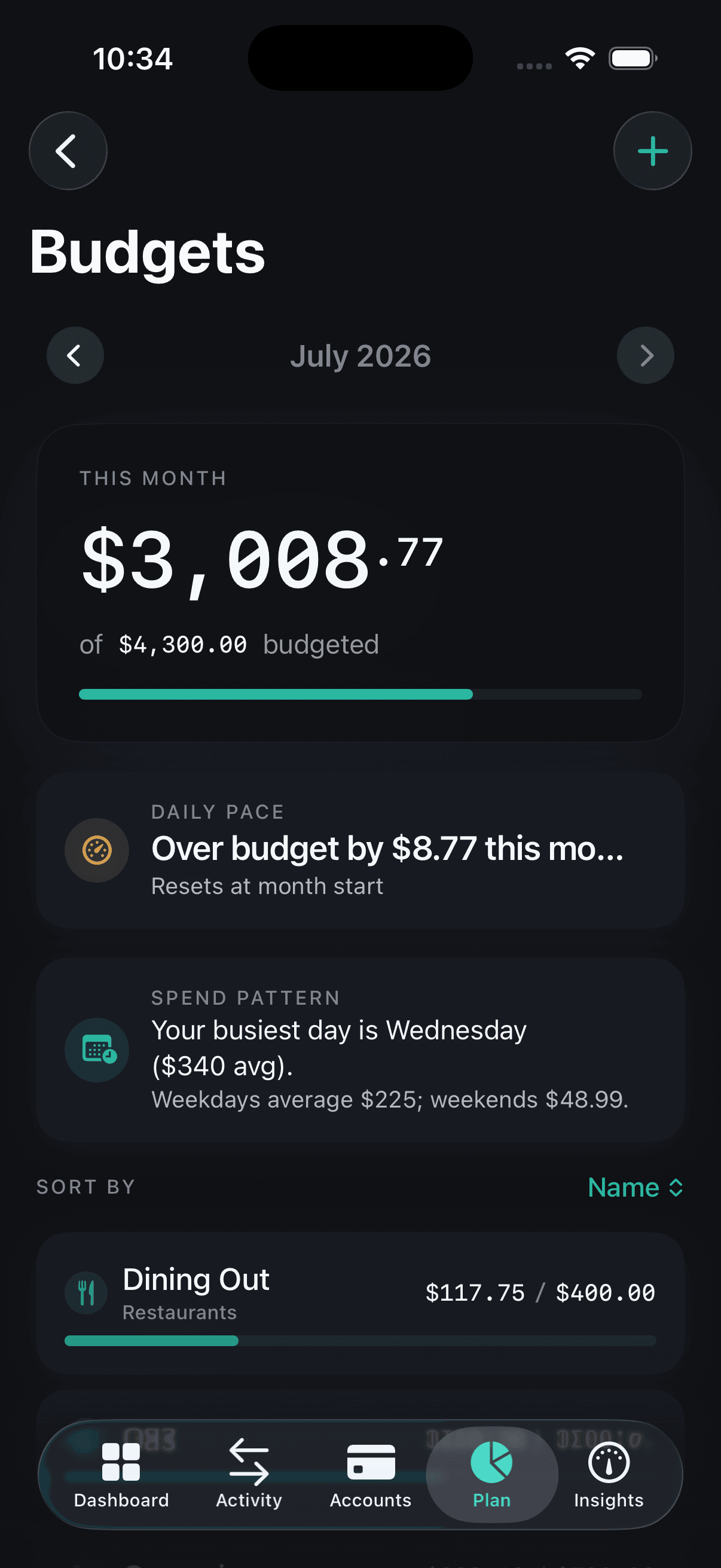
Norrith projects your balance against upcoming bills and everyday spending, so a tight week never sneaks up on you. Set savings goals and Norrith tells you the pace to reach them — turning "I should save" into a plan that's working.
30-day runwayOn track
$4,820
Projected balance on Jun 30 after bills + everyday spend.
Illustrative · not your data
Vacation fund
Lisbon · September$1,820 / $3,000
Save $295/mo for the next 4 months to hit it.
Private by design

Your money. Your data. Your call.

Your information is encrypted in transit and at rest, and bank connections are read-only through Plaid — Norrith never sees or stores your bank login. Turn AI features on or off, export your data, or delete your account any time. And we never sell your data — the business model isn't you.

Read-only connections
Connect safely; Norrith can't move a cent.
You're in control
Consent toggles, full export, one-tap delete.
Locked down
Face ID and two-factor authentication.
Read the full security overview
Pricing

Honest pricing.

One plan. No free tier — but the 7-day trial means you only pay if it earns it. No upsells, no usage fees, no "Pro+" tier hiding behind another paywall.

Most popular
7-day free trial
Norrith
$109.99CAD / year
That's $9.17 / month · Save 46% · $93.89 / yearLess than $0.30 a day — less than a coffee a month.
Free for 7 days. Charged $109.99 CAD on day 7 unless you cancel.We'll email you 2 days before billing starts. No surprise charges.
Every account in one place
Financial Health Score
Ask Norrith — answers in your own numbers
Budgets, bills, and runway
Net worth + investments, tracked daily
Shared expenses with your partner
Household sharing included — link your partner's account to yours for shared budgets, splits, and settle-up. Each partner has their own subscription.
Start free trial

Prices are in Canadian dollars before applicable tax — Apple collects it based on your region. Auto-renews until you cancel.

Frequently asked

Things people ask before they download.

Pre-launch & availability
When does Norrith launch?
Norrith launches in Canada in 2026. We're in the final stretch of polish and early-access testing. Join the waitlist and we'll send you a TestFlight invite as soon as the build is ready, then a launch code on day one. The US waitlist gets first access when we cross the border later in the year.
Will it work on iPad / Mac / Android?
Norrith is iPhone-only at launch (iOS 17 or later). It's a deliberate choice — focusing on one platform lets us ship a more polished experience than spreading thin across many. We may expand to other platforms in the future; iPhone is our focus for launch. Join the waitlist and we'll let you know when that changes.
Is Norrith available in French?
Yes. Norrith ships fully translated in English and French Canadian from day one — every screen, every notification, every help string. The app follows your iOS language by default, and you can override it in Settings → Language without restarting.
Pricing & billing
What does Norrith cost?
$109.99 CAD / year or $16.99 CAD / month. Both plans come with a 7-day free trial for first-time subscribers — card required, no charge if you cancel before day 7. Billing runs through the Apple App Store when you subscribe inside the iOS app, or through Stripe when you subscribe from norrith.com. Cancel any time (iOS Settings → Apple ID → Subscriptions for App Store, or your Norrith account for Stripe). Security, biometric lock, privacy mode, and full data export are part of every subscription — we don't tier security.
How does the 7-day free trial work?
Pick either plan and you get 7 days of full Norrith access. Card required up front through Apple. We'll send you an in-app reminder + push notification 2 days before billing starts so there are no surprises. Cancel any time before day 7 in iOS Settings and you're not charged. The free trial is available once per Apple ID across all Norrith plans — Apple enforces this at the subscription-group level, so trialing one plan uses up your trial for the other.
Why is there no free tier?
A free tier sounds generous, but in practice it usually comes with a catch — you pay with your data instead. Mint did that, monetizing users through ads, lead-gen, and selling insights to partners. We won't. Our business model is simple: you subscribe, we work for you. That means we don't sell your data, we don't run ads, and we have one customer (you), not two. Connecting your bank also has real per-user costs we pay every month, which makes a sustainable free tier impossible without compromising privacy or quality. To make sure Norrith is right for you before you commit, the first 7 days are free — see your real net worth, run the AI on your data, set up your first budget — and cancel any time during the trial at no charge.
How do I cancel?
If you subscribed through the iOS app: open Settings → Apple ID → Subscriptions, tap Norrith, and tap Cancel. If you subscribed on norrith.com (Stripe): sign in to your Norrith account and manage your subscription from the billing page — no email required. You can cancel during the free trial at no charge, or any time during a paid period; your access stays active until the end of the period you've already paid for, then quietly ends. We don't bury the cancel button or ask you to email us.
Can I get a refund?
For App Store purchases: Apple handles refunds. Open the Apple receipt for your Norrith subscription and tap Report a Problem, or visit reportaproblem.apple.com. Apple decides the outcome, but they generally accommodate reasonable requests — especially during the first few days of a billing period. For Stripe purchases on norrith.com: email support@norrith.com and we'll process the refund directly. Either way, if something on our end caused the issue, write to support@ and we'll help.
How does payment work — Apple, Stripe, or both?
Both — depending on where you sign up. Subscribe inside the iOS app and billing runs through the Apple App Store under your Apple ID. Subscribe on norrith.com and billing runs through Stripe under the card you put on file. Either way the plan, the price, and the 7-day free trial are identical; only the processor changes. Norrith never sees or stores your card number — Apple and Stripe each handle that directly. Apple-billed and Stripe-billed accounts can't currently be merged, so pick the route that fits how you signed up.
Trust & money safety
Can Norrith move money out of my accounts?
No. Norrith connects to your accounts in read-only mode through Plaid — the same secure aggregation provider used by major finance apps. That means Norrith can see balances and transactions to give you insights, but it physically can't move a dollar in or out. You'll never give Norrith your bank login either: when you connect a bank, Plaid handles the sign-in directly with your institution.
How does Norrith reach my accounts?
Through Plaid and direct bank APIs — read-only, never with your password stored on our side. Connections are protected by TLS pinning so they survive a hostile network. You can revoke access from inside the app any time.
Data, privacy & security
Is my data actually secure?
Yes — and here's exactly what that means in practice:
  • Encrypted in transit (TLS) and at rest.
  • Bank connections are read-only through Plaid; we never see or store your bank login.
  • Two-factor authentication and Face ID / biometric lock are available on your account.
  • You're in control: consent toggles, full export, and one-tap deletion are always available.
  • We don't sell your data. Ever.
For the full picture, see our Security page.
Where does my data live?
Encrypted at rest in a Canadian region (ca-central-1), encrypted in transit with TLS 1.3 + certificate pinning. Daily backups, never sold, never shared with advertisers. Independent penetration testing before launch.
What happens to my data when I cancel or delete my account?
If you cancel your subscription, your data stays put — you can resubscribe and pick up where you left off, or use the remainder of your paid period to export everything you need. If you delete your account (Settings → Account → Delete), we permanently remove your data after a 30-day grace period in case you change your mind. Linked bank connections are revoked immediately so we stop receiving new transactions. After deletion, the only things we may retain are minimal records required by law (such as billing receipts) — never your transaction or balance history.
What happens to my data if Norrith shuts down?
We don't plan to — but here's the commitment. Your data is yours, and you can export it at any time from inside the app (transactions, accounts, budgets, goals, the works). If we were ever to wind Norrith down, we'd give you advance notice and a 30-day export window before anything was deleted. No surprises like Mint left people with. This commitment is mirrored in our Terms of Service so it's contractual, not just marketing.
AI
What does the AI know about my money?
Just what's needed to answer you. When you use Ask Norrith or the auto-generated insights, summaries of your financial data (account balances, recent transactions by category, budget progress) are sent securely to our AI provider so it can answer in your real numbers. We use a paid, enterprise AI tier — your data isn't used to train any model, and it isn't shared with advertisers or data brokers. You can turn AI features off in Settings at any time, and merchant names from sensitive categories (like health) are never sent to the AI.
Is the AI giving me financial advice?
No — and this is important. Norrith and Ask Norrith are informational tools, not a substitute for professional advice. The AI can summarize what your money is doing and suggest patterns it notices, but it isn't a licensed financial planner, investment adviser, or tax adviser. For decisions that matter, double-check the numbers with your bank and talk to a qualified professional. AI can be wrong, and we'd rather you know that.
Banks & accounts
Which banks does Norrith support?
Every Canadian Big-6 (RBC, TD, Scotiabank, BMO, CIBC, National Bank) plus Tangerine, Simplii, EQ Bank, Desjardins, Wealthsimple, and the major credit unions. Anything not yet on Plaid can be tracked manually — cash, crypto wallets, or an obscure regional bank.
What if my bank isn't supported?
Norrith connects to thousands of banks, credit unions, and brokerages through Plaid, which covers most major North American institutions. If yours isn't on the list, you have two options. First — add it manually: track the account with manual balances and transactions; everything in the app still works (budgets, net worth, insights). Second — tell us: drop a note to support@norrith.com and we'll log the request. We expand coverage based on what users actually need.
Can I see USD accounts?
Yes — CAD and USD are first-class citizens. Per-account currency is preserved, and the dashboard converts to your home currency with a live FX rate. Add a Wealthsimple USD or RBC USD account and it shows up natively.
Day-to-day use
How often does Norrith update my balances and transactions?
Banks send updates throughout the day, and Norrith pulls them on a regular schedule — most users see new transactions land within a few hours of posting, depending on the institution. You can also pull to refresh any time to fetch the latest. Smaller credit unions tend to update less often than the big banks; if a transaction is missing, give it 24 hours before assuming something's wrong.
Does Norrith work without an internet connection?
Partly. Once your data has synced, you can open the app and view your accounts, transactions, budgets, and the Financial Health Score offline — Norrith caches everything locally. Live syncing, AI features, and bank connections need an internet connection to refresh. When you come back online, Norrith syncs in the background.
Why are some of my transactions categorized incorrectly?
Automatic categorization gets most transactions right, but no system is perfect — and the right category often depends on how you think about it. Tap any transaction to change its category, and use Rules to teach Norrith how to handle that merchant going forward. The more you tap, the smarter your books get.
Can my partner see my accounts?
Household sharing is included with every Norrith subscription. You choose which accounts your partner sees — down to the individual account. Mark anything as a private account and it stays invisible to them, no matter what. Each partner needs their own Norrith subscription.
Support
What if I have an issue or a feature request?
Email support@norrith.com — a real person reads everything that comes in, and we reply within a couple of business days. We genuinely use your feedback to shape the roadmap; many of the features in the app today started as a user note.

Money, sorted — coming soon.

Join the waitlist and be first in line when Norrith launches.

By joining, you agree we may email you about Norrith. One launch note — nothing else. See our Privacy Policy.